
Published 3 August 2026
You can get exposure to the aluminium price on Trading 212 without handling a single ingot. Instead, you invest in a product that follows the aluminium price and trades as easily as a share. This guide shows exactly how to buy aluminium on Trading 212, what moves it, and how to place your order.
Aluminium is one of the most widely used metals in the world, from cars and cans to construction and the power grid. Because smelting it uses so much electricity, its price is closely tied to energy costs. If you would rather spread across several base metals, we also cover the industrial metals basket on Trading 212.

Key Takeaways
- You buy aluminium through a futures-based commodity ETC, not physical metal or mining shares.
- The main option available on Trading 212 is WisdomTree Aluminium (ALUM), which tracks the Bloomberg Aluminium Subindex.
- Aluminium is energy-intensive to produce, so its price often tracks power and fuel costs.
- ALUM trades in US dollars with no GBP line, so a pound account pays the 0.15% currency fee on the buy and the sell.
- The ongoing charge is around 0.49% a year, and because it is futures-based, the roll can help or hurt returns.
What You Are Actually Buying
Buying aluminium on Trading 212 does not mean metal delivered to you, and it does not mean buying shares in a producer either. Instead, you buy an Exchange-Traded Commodity (ETC) that tracks the price of aluminium futures. Rather than storing physical metal, it uses futures contracts to follow the market, with collateral held to back the position. Aluminium is one corner of a wider asset class, and our guide on the commodities market covers the full range.
A Single Metal, Not a Basket
Aluminium is a focused, single-metal exposure. WisdomTree Aluminium (ALUM) tracks the Bloomberg Aluminium Subindex, which follows aluminium futures on the metals market. Because it is one metal, its price can swing on its own drivers, especially power prices, since smelting is highly energy-intensive.
If a single metal feels too concentrated, you can spread the risk across several base metals in one trade. Our industrial metals guide covers the basket that holds aluminium alongside copper, nickel and zinc.
Things to Watch Out For (Fees, Currency and the Roll)
The exposure is futures-based, so the ETC rolls contracts forward as they near expiry, and the shape of the futures curve can add to or subtract from returns. That means it may not track the headline spot price exactly, which is normal for futures-based commodity exposure.
On costs, WisdomTree Aluminium is priced in US dollars and currently has no pound-denominated line, so a GBP account pays Trading 212’s 0.15% currency conversion fee on both the buy and the sell. The ongoing charge, shown as the expense ratio, is around 0.49% a year, and using a limit order helps you control your entry price.
The ETC Questionnaire
There is also one quick step to know about before your first purchase. Because ETCs are classed as complex products, Trading 212 may ask you to complete a short appropriateness questionnaire before you can buy one. Our guide to the Trading 212 ETC questionnaire explains exactly what it asks and how to complete it.
How to Buy Aluminium on Trading 212: Step by Step
Step 1: The Search
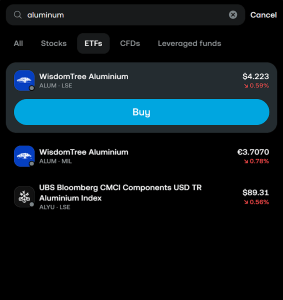
Open the search, the magnifying glass icon, and type Aluminium. Filter to the ETFs section to skip leveraged products and land on the standard tracker.
Step 2: Choosing Your Product
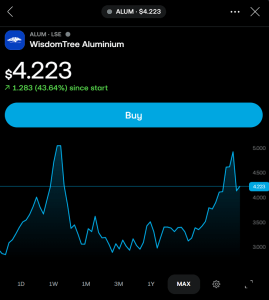
At the time of writing, the main option available on Trading 212 is WisdomTree Aluminium (ALUM), which tracks the Bloomberg Aluminium Subindex. Check the name says “Aluminium” rather than a basket or an equity fund. Note that it currently trades in US dollars, as there is no pound-denominated line at the time of writing. Fund availability can change, so it is worth checking Trading 212 for the latest options before you buy.
Step 3: Checking the Details
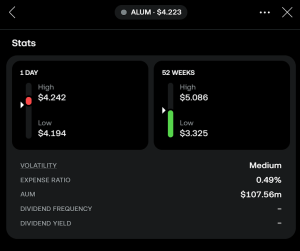
Click into the product and scroll to Instrument Details. Confirm the ongoing charge, shown as the expense ratio, is around 0.49%, and check the currency, which will read USD for ALUM. This is also where you can confirm it is the futures-based commodity ETC rather than an equity fund.
Step 4: Market vs Limit Orders
When you press buy you have a choice in the top right. A market order buys instantly at the current price, which is convenient but can slip if the price moves while it processes. A limit order lets you set the maximum you will pay and only fills if the price dips to your level.
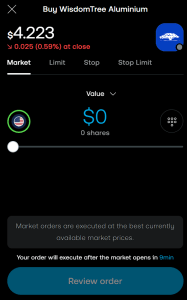
Market and limit orders are just the starting point. Trading 212 also offers stop orders, stop-limit orders, and other tools that can help you buy at a specific price or protect against sudden drops. For a full breakdown of how each order type works and when to use them, see our guide on Trading 212 order types.
Conclusion
For most people, WisdomTree Aluminium (ALUM) is the simplest way to track the aluminium price on Trading 212. Bear in mind it is priced in dollars, so a pound account pays the currency fee, and the exposure is futures-based. If a single metal feels too concentrated, the industrial metals basket spreads the risk across several base metals.
FAQ
What Drives the Aluminium Price?
Aluminium tracks industrial demand and supply, but because smelting uses huge amounts of electricity, its price is unusually sensitive to energy costs.
Is WisdomTree Aluminium an ETF of Mining Shares?
No. It is a commodity ETC that tracks aluminium futures, not the shares of producers, so it moves with the metal price rather than company earnings.
Does It Have a Currency Fee?
Yes, if your account is in a currency other than US dollars. Because ALUM is priced in US dollars, Trading 212’s 0.15% currency conversion fee applies each time you buy or sell, so a pound account pays it on both trades. The ongoing charge is around 0.49% a year.
Can I Hold Aluminium in an ISA?
Yes. Aluminium ETCs can be held in a Stocks and Shares ISA, which shelters any gains from tax.
Why Might It Not Track the Spot Price Exactly?
Because it tracks futures rather than physical metal, and rolling contracts forward can add to or subtract from returns depending on the shape of the curve.