
Updated 30 October 2026
Knowing how to withdraw money from Trading 212 matters more than any feature list: a low-fee platform with a tidy app counts for little if you can’t get your cash back out when you need it.
The good news is that you can. Withdrawals are free and routine, and the friction people hit is almost always one of a few specific rules, not the platform holding onto your money.
Here is exactly how withdrawals work, the same-method rule that surprises people most, what each status means, and why a withdrawal can be held up.

Key Takeaways
- Withdrawals are completely free and done entirely in the app; you can get your money out.
- Trading 212 uses a “same-method” return policy: money goes back to the method you deposited with first, and profits above that come out by bank transfer.
- Card withdrawals can take up to three business days, and bank transfers a similar time plus your own bank’s processing.
- The usual hold-ups are the same-method rule, locked promo or ISA-reward funds, and the 1-2 day settlement after you sell.
How Withdrawals Actually Work on Trading 212
Withdrawing is straightforward: open the app, go to your account, tap withdraw, choose the amount, and confirm.
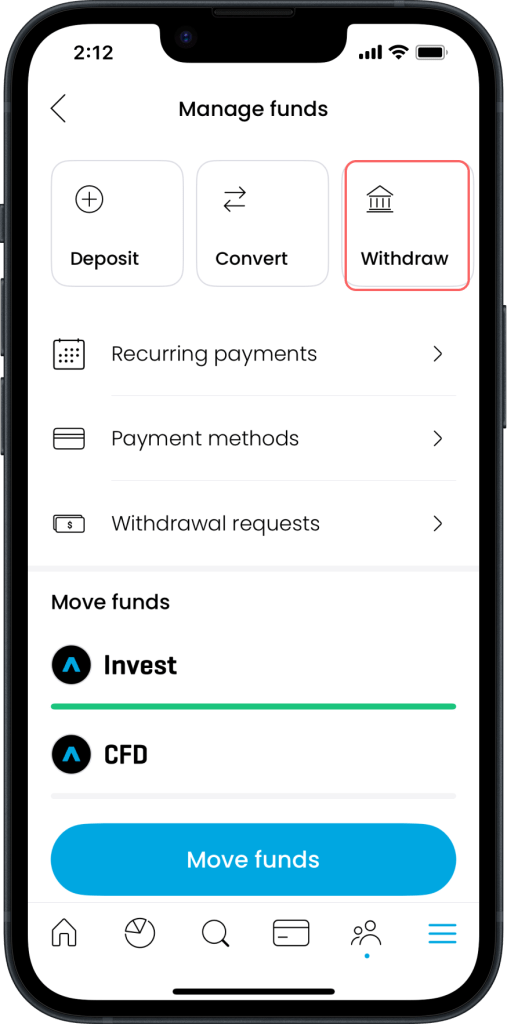
Trading 212 supports several methods, bank transfer, debit or credit card, PayPal, Apple Pay and Google Pay, and the process is free.

As a rough guide on timing, card withdrawals can take up to three business days, though many arrive faster, while a bank transfer can take a similar time on Trading 212’s end plus up to three more business days for the funds to reach you once processed, with exact timings depending on your bank.
Knowing which method you originally deposited with matters here because of the rule that comes next. Our guide on how to deposit on Trading 212 covers funding your Trading 212 account in detail, and our guide on how to use Trading 212 covers the account as a whole.
The Same-Method Return Rule
This is the single biggest source of confusion.
Trading 212 operates a same-method return policy: if you deposited using your Visa debit card, your withdrawal goes back to that same card first, up to the amount you originally deposited with it.
You then withdraw any profit above that deposited amount by bank transfer or another method.
So if you funded the account with £1,000 on a card and it has grown to £1,300, the first £1,000 returns to the card and the £300 of gains comes out by bank transfer. You cannot simply send the whole £1,300 to your bank in one go.
If you have lost access to that card because it expired or you switched banks, you can verify the old method by uploading a bank statement.
It is an anti-fraud measure common across payment processing, not a trap, but it catches a lot of people who expect to withdraw everything to one place.
Tracking Your Withdrawal and What the Statuses Mean
The Withdrawal Tracker lets you follow a withdrawal from request to arrival.
Open the Menu, go to Manage Funds, tap Withdrawal Requests, and select your withdrawal to see the details.
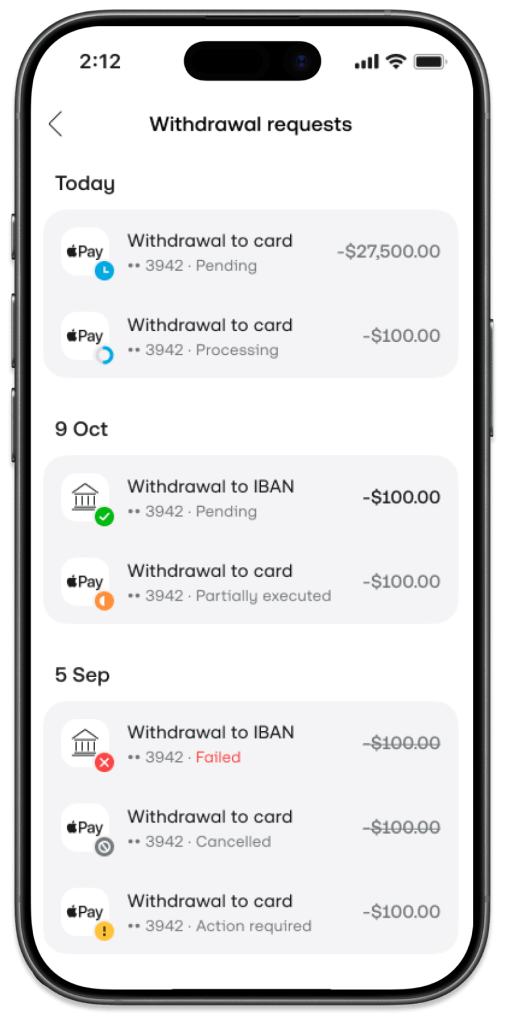
As it moves through the system, you will see it pass through a series of statuses:
| Status | What it means |
| Pending | Waiting for recently closed positions to settle, typically one to two business days |
| Under Review | A routine internal check to make sure everything is in order |
| Processing | The request has moved to the payment provider and is being handled |
| Partially Executed | Part has been sent, and the rest returned to your account (can happen when a card provider caps a single payout) |
| Executed | Trading 212 has sent the funds; your bank may still take up to three business days to show them |
| Failed / Rejected / Action Required / Cancelled | Payment declined (retry or switch method), Trading 212 needs to hear from you, or you cancelled it and the money is still in your account |
Why Your Withdrawal Might Be Held Up
Beyond the same-method rule, two things commonly cause a hold-up for withdrawals on Trading 212, and both are normal.
The first is locked or restricted funds.
If you received free fractional shares through a referral or promo, their value may not be withdrawable until certain conditions are met. ISA cashback rewards are typically locked for around twelve months, and money still invested in stocks or funds has to be sold before it becomes withdrawable cash.
So a £500 balance might only let you withdraw £400 if £100 of it is a locked reward.
The second is the settlement period: when you sell an investment, the cash does not appear instantly.
There is usually a 1-2 business-day settlement while the trade finalises.
Sell on Monday morning and try to withdraw straight away, and a “Pending” status is exactly what you would expect; the money is coming… it just needs to settle first.
What to Do if Something Goes Wrong
If you have done everything right and the money still has not arrived, do not panic.
Give it the full three business days. Remember that weekends and public holidays do not count.
If more than three business days have passed, contact Trading 212 support. You can do this through the app or by email. Trading 212 can provide proof of payment to your bank if the delay is there.
It is also worth checking your bank’s processing times. Smaller or online-only banks can sometimes be slower. A large first-time withdrawal may also trigger security checks; this means the delay is not always on Trading 212’s side.
Before worrying, check the withdrawal tracker. It shows whether the request is still processing or Trading 212 has sent it to your bank.
Is There a Fee to Withdraw?
No. Trading 212 does not charge a fee to withdraw your money by any method.
That is consistent with the platform’s low-cost approach, which our guide to Trading 212 fees sets out in full.
It is also worth knowing that money you have not yet withdrawn does not have to sit idle.
You can earn interest on cash on an uninvested balance, so money you haven’t yet moved or reinvested keeps working in the meantime.
Conclusion
Withdrawing from Trading 212 is free and usually quick, and the problems people run into are almost always payment-method restrictions, locked rewards or settlement timing rather than the platform itself.
Before your first withdrawal, make sure you know which method you deposited with, that your verification is up to date, and that you have sold any positions and let them settle.
Do those three things, and the process should be smooth.
FAQ
How long does Trading 212 take to withdraw?
Usually up to three business days after Trading 212 processes the withdrawal, plus any time your own bank takes. It is often faster, and weekends and holidays do not count.
Why can I withdraw less than my balance?
Trading 212 may lock some funds, such as free fractional shares from the promo code or ISA cashback rewards, or the money is still invested, or a recent sale has not settled. The same-method rule can also apply. (Capital at Risk. Terms Apply.)
Is there a withdrawal fee on Trading 212?
No. There is no fee to withdraw your money by any method.
Why has my withdrawal not arrived?
Most often, a recent sale is still settling, the same-method check needs your old card verified, or your bank is running its own checks. The in-app withdrawal tracker shows where it is.