
Updated 30 October 2026
Trading 212’s Import and Export features let you move a stock in or out of a Pie without selling or rebuying it. There’s no spread cost and no capital gains event; the shares simply change location in the app while your position and average cost stay exactly the same.
Whether you’re tidying older holdings into a Pie, restructuring your strategy, or stepping away from a copied Pie that’s changed, this guide explains exactly what importing and exporting do, when to use each, and what to watch for.
Trading 212 Import and Export features let you step outside that automatic adjustment. They move stocks in and out of a Pie without any buying or selling at all.
Here is exactly what each one does, when to use it, and what to watch for.

Key Takeaways
- Exporting moves a stock out of a Pie into your general portfolio; importing brings an outside holding into a Pie.
- Neither action sells nor buys, so there is no spread cost, and no capital gains event triggered.
- A stock can only live in one Pie at a time, so moving between Pies means export then import.
- To import a stock, it must already exist as a slice in the Pie, and exporting leaves the slice behind at 0%.
The Short Answer
| Importing | Exporting | |
| What it does | Moves a stock you already hold in your general portfolio into a Pie | Moves shares held inside a Pie out into your general portfolio |
| Direction | General portfolio → Pie | Pie → general portfolio |
| Triggers a sale or buy? | No. No spread cost, no tax event | No. No spread cost, no tax event |
| Key condition | The stock must already exist as a slice in the Pie (add the slice first) | Leaves the slice behind at 0%. Remove it manually if you no longer want it |
| After the move | Stock falls under the Pie’s rules: AutoInvest, rebalancing and target weighting | Stock becomes an individually held position you manage by hand |
Exporting takes a stock out of your Pie and moves it into your general portfolio as an individually held position; importing does the opposite, bringing a stock you hold outside a Pie back into one.
The crucial part is that neither action sells or buys anything, so there is no spread cost, and no capital gains event triggered.
Together, Trading 212 Import and Export let you diverge from a copied Pie without automated rebalancing, forcing trades you did not want.
They work slightly differently under the hood, though, so it is worth understanding each before you start moving things around. For the wider picture of how Pies themselves fit in, see our guide on how to use Trading 212.
(Execution only service. Not investment advice or portfolio management)
Why Use Import and Export?
There are a few useful reasons.
Tidying up is the common one: many people manually buy stocks before they discover Pies, then want everything in one organised place. Importing folds those earlier purchases into a Pie without having to sell and rebuy, which would cost the spread and possibly trigger a gain depending on how much the stock has risen.
Restructuring is another: if you are consolidating two Pies into one or changing strategy, you can export everything out, reshape the allocations, and import it back in, keeping your holdings intact throughout.
Exporting also lets you sell a single holding cleanly. Move it out first, and you can sell it from your general portfolio without the Pie trying to rebalance around the missing slice. Gifted or promotional shares that land outside a Pie can be imported into your strategy too, rather than left floating around on their own.
In each of these cases, the alternative would be selling and rebuying, which costs the spread twice and can crystallise a gain, so moving the holding instead is what keeps the change cost-free.
What Importing Does
Importing takes a stock you already own in your general portfolio, what Trading 212 calls your Investments section, and moves it inside a Pie.
The shares physically change location within the app, but they are not sold and rebought: they simply transfer from your general holdings into the Pie’s holdings, so there is no sale, no buy, no tax event and no spread cost.
Once inside, that stock falls under the Pie’s rules.
It becomes subject to AutoInvest, rebalancing and the percentage weighting you have set for it within that Pie.
Importing relies on fractional shares to fit holdings to a Pie’s targets, the same mechanism that lets Pies hold precise percentages in the first place.
What Exporting Does
Exporting is the reverse: it takes shares held inside a Pie and moves them out into your general portfolio.
Again, no sale is triggered, and the number of shares and your average cost basis stay the same.
The situations where it helps are specific: you want to sell one holding without triggering a full Pie rebalance; you are closing a Pie down but want to keep the stocks rather than sell everything; you want to manage one particular stock by hand from now on; or you are moving a stock from one Pie to another, which means exporting from the first and importing into the second.
In each case, you keep your position exactly as it was, just outside the Pie’s automation.
How to Import into a Trading 212 Pie
The process is short.
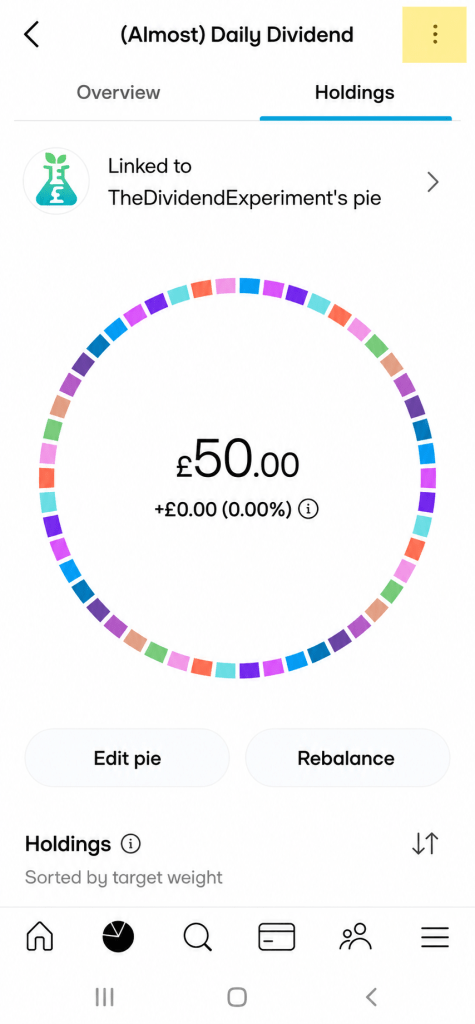
Open your Pie and tap the three-dot menu or settings icon, depending on your app version.
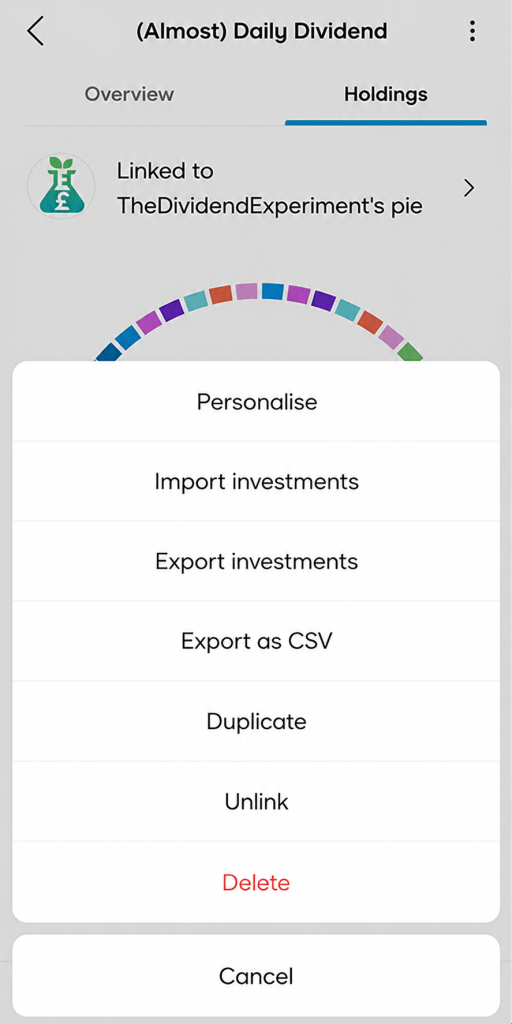
Select Import, and you will see a list of stocks you hold outside any Pie that are eligible.
Choose the ones you want and confirm, and the shares move across immediately.
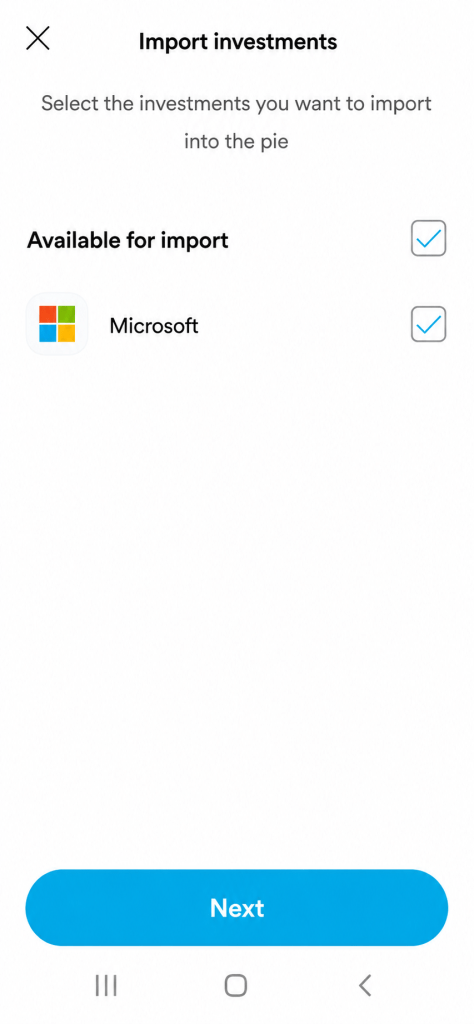
One important condition: if the stock is not already a slice in your Pie, you have to add it as a slice first, so the Pie knows it belongs there and what percentage to assign it.
Otherwise, there is nowhere for the imported holding to sit.
(Execution only service. Not investment advice or portfolio management)
How to Export From a Trading 212 Pie
Exporting mirrors that.
Open your Pie, go to the settings or three-dot menu, and select Export.
You will see the holdings inside your Pie; select the ones to move out and confirm, and the shares move to your general Investments section.
The detail to remember is that exporting does not remove the slice from the Pie.
The slice stays behind at 0%, or with a small balance if you did not export everything.
So if you no longer want that stock in your allocation, you should remove the slice manually afterwards, otherwise the Pie will try to buy it again on your next deposit.
(Execution only service. Not investment advice or portfolio management)
Things to Watch Out For
Fractional shares can sometimes complicate a move, so it is sensible to double-check your holdings after importing or exporting rather than assuming everything transferred cleanly.
Importing does not trigger an immediate rebalance, so your Pie can sit temporarily out of balance and will only correct gradually as you add new money or if you run a manual rebalance.
A stock can only live in one Pie at a time, so there is no direct Pie-to-Pie transfer: to move something from Pie A to Pie B you export it from A first, then import it into B.
Our guide to Model Pies covers how the automated rules behave once a holding is inside a Pie.
Conclusion
Importing and exporting on Trading 212 are simple: importing brings outside holdings into a Pie, exporting moves them back outside of the Pie, and neither one triggers a buy or sell.
That lets you keep your portfolio tidy, restructure without tax headaches, and diverge from a copied Pie without paying for trades you did not want.
Just remember the rules: a stock lives in one Pie at a time, a slice must exist before you can import into it, and exporting leaves an empty slice you may want to clear up.
FAQ
Does importing or exporting from a Pie trigger a sale?
No. Import and Export on Trading 212 simply move shares between your Pie and your general portfolio. There is no sale, no purchase, and no capital gains event.
Can a stock be in two Pies at once?
No. A stock can only live in one Pie at a time. To move it, export it from the first Pie and import it into the second.
Why can I not import a stock into my Pie?
The stock must already exist as a slice in that Pie. Add it as a slice first, then import your existing holding into it.
Does exporting remove the slice from my Pie?
No. The slice stays behind at 0%, or with a small balance if you did not export everything. You can remove it manually afterwards.