
Updated 23 October 2026
Short answer: Open your pie in the Trading 212 app, go to the Holdings tab, and look for a reference to the original pie.
- If it shows a link back, you’re connected and will receive update notifications.
- If there’s no link, your copy is independent, most likely because it was duplicated rather than copied, or because you customised it.
Either way, nothing ever changes in your pie without you accepting it.
How to Check If Your Trading 212 Pie Copy Is Linked
- Go to your pie in the app.
- Head to the Holdings tab.
- Look for a reference to the original pie.
If it’s showing a link back to the original, you’re connected. If there’s no link, your copy is independent and you won’t receive update notifications.
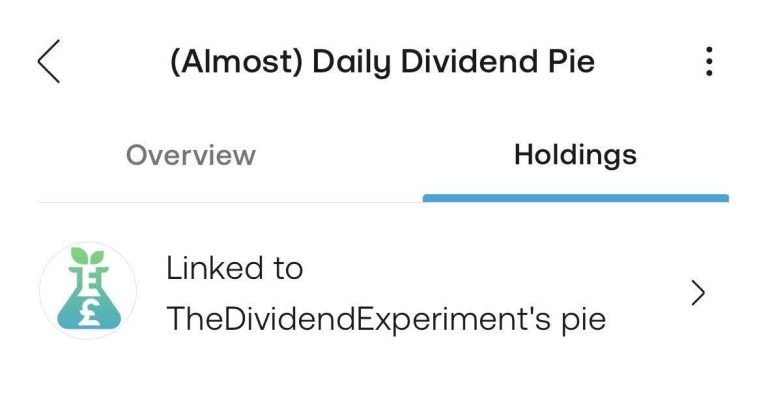

What It Means When Your Pie Copy Is Linked
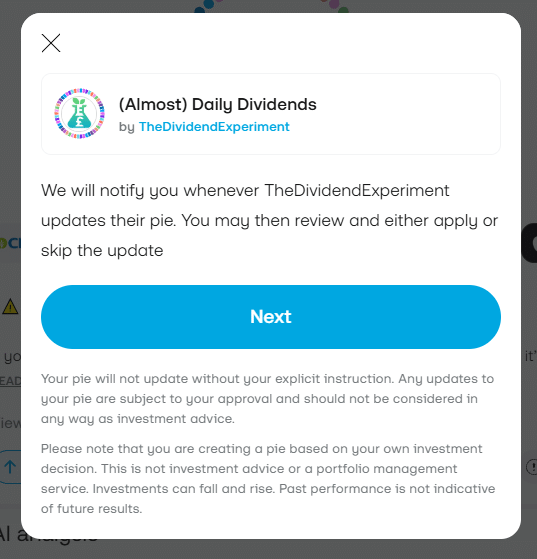
When you copy a pie on Trading 212, your version is automatically linked to the original. Whenever I make a change, adding a stock, removing one or adjusting target weightings, you get a notification via the bell icon in the social tab.
From the notification you can tap through, see exactly what’s changed, compare it with your current version, and decide what to do.
That’s the key point: it’s your decision. You can accept the update and bring your pie in line with the new version, or ignore it and leave your pie exactly as it is. Nothing changes in your account without your say-so.
Should You Accept Pie Updates?
Not necessarily, and it’s worth thinking about before you hit accept. Accepting an update brings your pie in line with the current version of the original. If you’ve made personal customisations, adjusted weightings, added stocks, removed ones you didn’t want, accepting could override those changes.
So before accepting, review what’s actually changing:
- If your pie matches the original and you want to keep it that way, accepting makes sense.
- If you’ve deliberately personalised your version, or you simply don’t agree with a particular change I’ve made, which is completely fine since it’s your money and your strategy, ignoring the update is a valid choice.
The notification system is there to keep you informed, not to pressure you.
Copying vs Duplicating a Pie on Trading 212
If you’re not linked, it may be because of how you added the pie in the first place. Copying and duplicating on Trading 212 are not the same thing.
- Copying: what most people do by finding the pie in the library or through a shared link. Your version stays linked to the original and you get update notifications.
- Duplicating: a separate function that takes a snapshot at that moment. That copy is completely independent: no link back, no notifications, and changes to one don’t affect the other.
So if you want to stay in sync with updates to the (Almost) Daily Dividends pie, make sure you’ve used the copy function rather than duplicate.
Why Was the Pie Updated? Where to Find the Reasoning
When a notification lands it tells you what changed but not why; Trading 212 shows the before and after, not the reasoning.
For the full picture, why a stock was added or removed and what it means for the portfolio, I send a detailed email every time the pie is updated. You can sign up via the update email list. Every change is also recorded on the changelog page.
Updates aren’t frequent. Looking back at the changelog, core updates have happened roughly once a year, which reflects the kind of stable blue-chip companies in the pie rather than any particular design decision.
If you’re not seeing many notifications, that’s a good sign: the holdings are doing what they’re supposed to. When and why changes happen is covered in how often does the pie change?
Checking Your Pie Copy: Quick Recap
- Check the Holdings tab to confirm you’re linked.
- Keep an eye on the bell icon for notifications.
- Check the changelog for context on any change.
- Take a moment before accepting an update to make sure it’s right for your version of the pie.
You’re always in control.
The pie itself is covered on the (Almost) Daily Dividends Portfolio page.